
今回は、ファイルのハッシュ値を取得する方法と Autoit で作成したサンプルコードを紹介します。
ハッシュ値とは、簡単に言うとファイルの身分証明書と言えます。
ただ、ハッシュ値は身分証明書よりも厳密であり、ファイルサイズ、時間、タイプ、作成者、マシンなどに基づいて計算され、少しでも変更があればハッシュ値が変わってきます。
ハッシュ値は多くの場合、ファイルの同一性の確認に使われます。
例えば当サイトでは筆者の自作ソフトを配布していますが、ソフトのハッシュ値とユーザー様がダウンロードしたソフトのハッシュ値が一致すれば正しいファイルとなりますが、もしもハッシュ値が一致しなければ次のように正しいファイルとは言えません。
- ファイルのバージョンが違う
- ファイルが壊れている
- ファイルが改ざん(第三者がプログラムを書き換えること)されている
ハッシュ値の取得
ハッシュ値の取得には Windows のコマンド「certutil」を使用します。
取得できるハッシュアルゴリズムは
- MD2
- MD4
- MD5
- SHA1
- SHA256
- SHA384
- SHA512
の7つです。
コマンドの書き方は次のようになります。
%systemroot%\System32\certutil.exe -hashfile %path% MD5「%path%」の部分がファイル名、「MD5」の部分がアルゴリズムになります。
指定するファイル名にスペースが含まれている場合、ダブルクォーテーション(””)で囲む必要があります。
ファイル: “C:\Program Files\WinMyMenu\WinMyMenu.exe” アルゴリズム:MD5 を指定した例
%systemroot%\System32\certutil.exe -hashfile "C:\Program Files\WinMyMenu\WinMyMenu.exe" MD5実際にコマンドプロンプトを開いて実行してみてください。
コマンドプロンプトの開き方を見る
1.Windowsキー + R を押して「ファイル名を指定して実行」を開きます。
2.「cmd」と入力します。
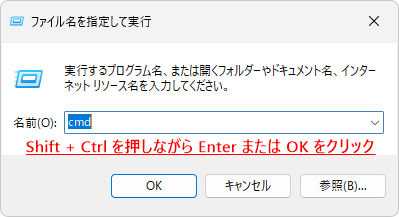
3.Shiftキー + Ctrlキーを押しながら Enter を押してください。

4.「ユーザーアカウント制御」が表示されたら「はい」をクリックします。

コマンドを入力します。

Enter を押すとハッシュ値が表示されます。

Windows のコマンド「certutil」を利用した Autoit のサンプルコード
サンプルコード
2022/12/21: コードの修正を行いました。
#include <EditConstants.au3>
#include <GUIConstantsEx.au3>
#include <WindowsConstants.au3>
#include <Constants.au3>
#include-once

Opt("TrayIconHide", 0)

$Form1 = GUICreate("ハッシュ値の確認ツール", 448, 303, 206, 143, -1, BitOR($WS_EX_TOPMOST, $WS_EX_ACCEPTFILES))
GUISetBkColor(0xFFFFFF)
$Radio1 = GUICtrlCreateRadio("MD2", 40, 48, 113, 17)
$Radio2 = GUICtrlCreateRadio("MD4", 40, 80, 113, 17)
$Radio3 = GUICtrlCreateRadio("MD5", 40, 112, 113, 17)
GUICtrlSetState(-1, $GUI_CHECKED)
$Radio4 = GUICtrlCreateRadio("SHA1", 176, 48, 113, 17)
$Radio5 = GUICtrlCreateRadio("SHA256", 176, 80, 113, 17)
$Radio6 = GUICtrlCreateRadio("SHA384", 176, 112, 113, 17)
$Radio7 = GUICtrlCreateRadio("SHA512", 312, 48, 113, 17)
GUICtrlCreateGroup("", 16, 24, 417, 121)
$Edit1 = GUICtrlCreateEdit("", 16, 160, 417, 77, $ES_AUTOVSCROLL)
GUICtrlSetState($Edit1, $GUI_DROPACCEPTED)
$Button1 = GUICtrlCreateButton("コピー", 328, 252, 105, 33)
$Button2 = GUICtrlCreateButton("リセット", 203, 252, 105, 33)
GUISetState(@SW_SHOW)

If IsAdmin() Then ; 管理者として実行するとドラッグ&ドロップができない問題を回避する
    _ChangeWindowMessageFilterEx($Form1, 0x233, 1) ; $WM_DROPFILES
    _ChangeWindowMessageFilterEx($Form1, $WM_COPYDATA, 1) ; redundant?
    _ChangeWindowMessageFilterEx($Form1, 0x0049, 1) ; $WM_COPYGLOBALDATA
EndIf

While 1
    $nMsg = GUIGetMsg()
    Switch $nMsg
        Case $GUI_EVENT_CLOSE
            Exit
        Case $Button1
            Copy();ハッシュ値をコピーします。
        Case $Button2
            GUICtrlSetData($Edit1, ""); エディットコントロールの文字を削除します。
        Case $GUI_EVENT_DROPPED
            GUICtrlSetData($Edit1, "")
            If Not StringInStr(FileGetAttrib(@GUI_DragFile), "D") Then; フォルダー以外のファイルのみ対応
                CheckRadio(@GUI_DragFile)
            EndIf
    EndSwitch
WEnd

Func CheckRadio($_DragFile)
    Local $txt
    For $i = 1 To 7
        If _IsChecked(Eval("Radio" & $i)) Then; ラジオボタンがチェックされていれば
            $iPID = Run(@ComSpec & ' /c %systemroot%\System32\certutil.exe -hashfile "' & _
                    $_DragFile & '" ' & GUICtrlRead(Eval("Radio" & $i), 1), "", @SW_HIDE, _
                    $STDOUT_CHILD)
            While 1
                $sOutput = StdoutRead($iPID)

                If @error Then ExitLoop
                $txt &= $sOutput
            WEnd

            $String = StringRegExp($txt, "(?m)^([^:]+)\r$", 1)
            If Not @error Then
                GUICtrlSetData($Edit1, GUICtrlRead(Eval("Radio" & $i), 1) & ' ハッシュ値:' & @CRLF & $String[0])
                ExitLoop
            EndIf
        EndIf
    Next
EndFunc   ;==>CheckRadio

Func Copy()
    If GUICtrlRead($Edit1) <> "" Then
        ClipPut(GUICtrlRead($Edit1))
        MsgBox(0, "コピー", "コピーしました", 1, $Form1)
    EndIf
EndFunc   ;==>Copy

Func _IsChecked($iControlID)
    Return BitAND(GUICtrlRead($iControlID), $GUI_CHECKED) = $GUI_CHECKED
EndFunc   ;==>_IsChecked

Func _ChangeWindowMessageFilterEx($hwnd, $iMsg, $iAction)
    Local $aCall = DllCall("user32.dll", "bool", "ChangeWindowMessageFilterEx", _
            "hwnd", $hwnd, _
            "dword", $iMsg, _
            "dword", $iAction, _
            "ptr", 0)
    If @error Or Not $aCall[0] Then Return SetError(1, 0, 0)
    Return 1
EndFunc   ;==>_ChangeWindowMessageFilterEx
ハッシュ値の確認ツールの使い方
取得したいハッシュアルゴリズムを選択し、ファイルをエディットコントロールにドラッグ&ドロップをするとハッシュ値が表示されます。
実際に実行してみた動画をご覧ください。

- 「リセット」ボタンをクリックすると出力された内容が消去されます。
- 「コピー」ボタンをクリックすると出力された内容をコピーすることができます。

コメント